Think of the time your work order was delayed. Your production manager spent 45 minutes checking four systems, updating three spreadsheets, and mailing five teams. All this while, the issue remained unresolved.
The reason? A gap in coordination. AI agent workflows could have reduced coordination efforts here.
Operational teams rely on systems like ERP, MES, and document repositories to keep work moving. But these systems need manual intervention to share information or coordinate actions.
When a work order is delayed, plant managers typically have to:
- Identify the issue
- Review the production schedule
- Check if any kits or components are missing
- Coordinate with the responsible department
- Update stakeholders and production records
That is clearly a lot of work for your team.
Traditional automation can manage individual steps. The challenge arises while working around changing conditions, incomplete data, or business context.
For such situations, AI agents collect and interpret information as part of a workflow. This helps them determine the next step and finish approved actions across connected systems.
What is an AI agent workflow?
AI agents are smart assistants that can understand your organization’s information, make decisions based on context, and use digital tools to achieve business goals.
Think of an AI agent as a new employee in your team who needs access to policies, to-do guides, and procedures to get work done. With the right information, it can follow your business rules while documenting its actions.
AI agent workflow defines the goal and trigger for the agent. It outlines data sources, approval points, business rules, and actions needed to complete the process.
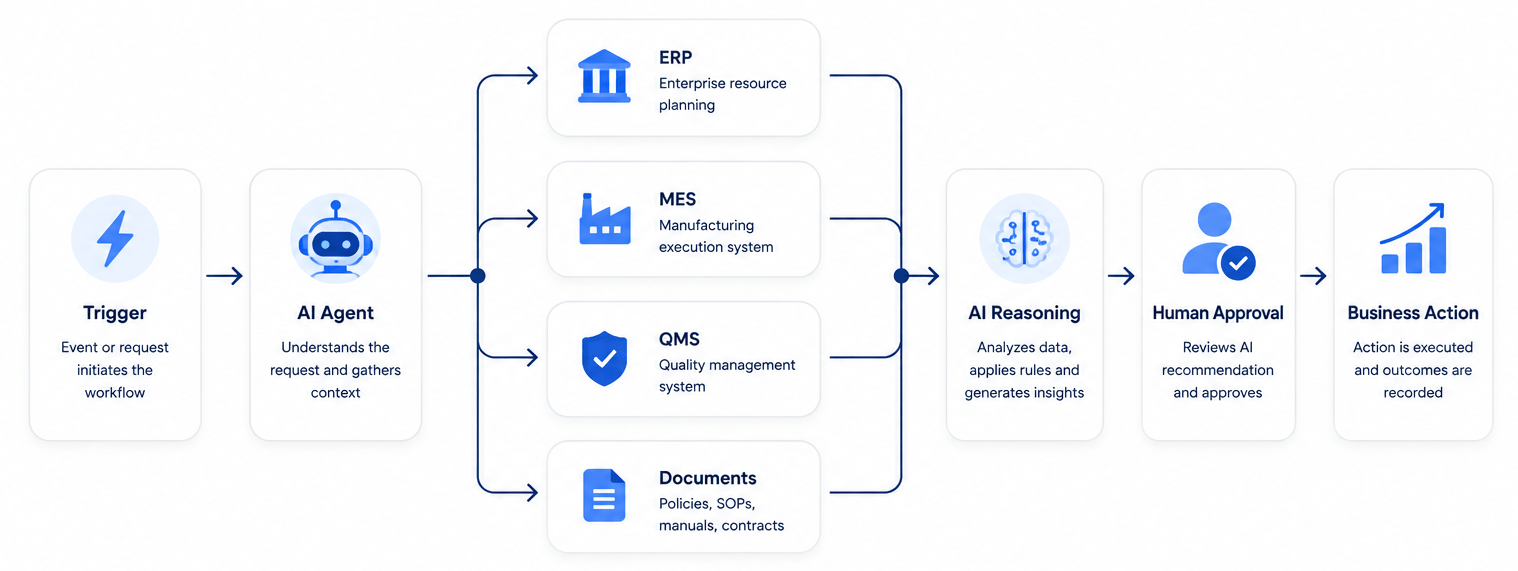
If work orders are overdue, an agent can:
- Detect a missed milestone in manufacturing.
- Retrieve the status of work orders from the MES.
- Use ERP to check if materials are available.
- Review production notes along with outstanding quality issues.
- Identify the likely cause of the delay.
- Suggest a revised action or completion date.
- Request the production manager to grant approval.
- Update the appropriate systems while notifying affected teams.
The agent doesn’t follow the same sequence every time. It adapts based on the condition. It chooses the next action as per available information, following the limits set by your business.
In other words, an agent is a system that analyzes operational information. It makes calculated decisions and coordinates workflows. An agent can apply these abilities to specific business processes, adding value for enterprises.
AI agent workflows vs. traditional automation
Traditional automation sticks to predefined logic. When an event happens, traditional automation follows rules that are predefined.
If you are sending a notification when your inventory touches a threshold, traditional automation works well. It’s also good for creating a task when a work order changes status, or for moving data between fixed fields.
An AI agent workflow is ideal when a process requires interpretation.
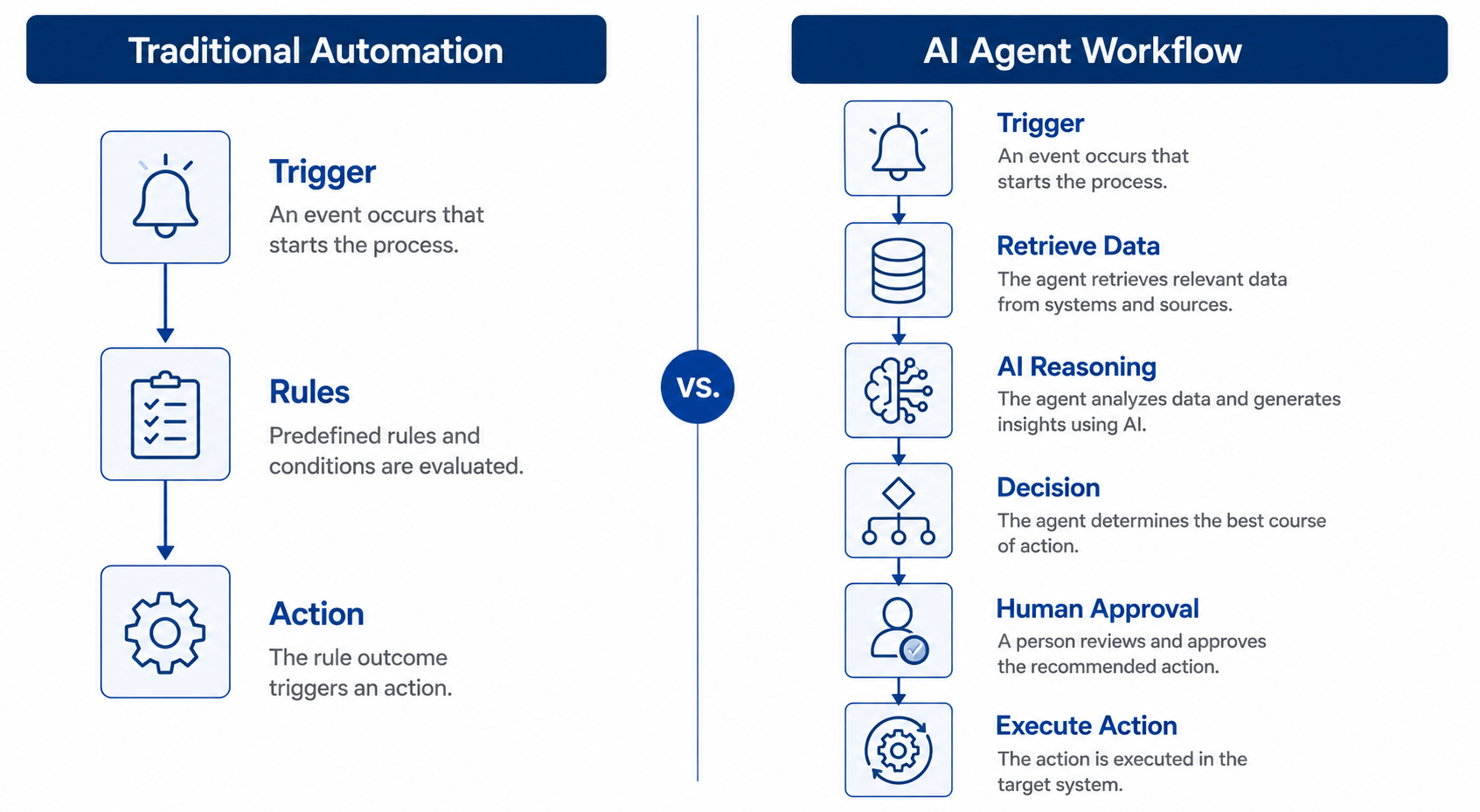
Both approaches complement each other. An agent can interpret a supplier’s email and identify a potential risk in delivery. Conventional automation can then generate a task, notify procurement, and make changes in a dashboard.
How do AI agent workflows work?
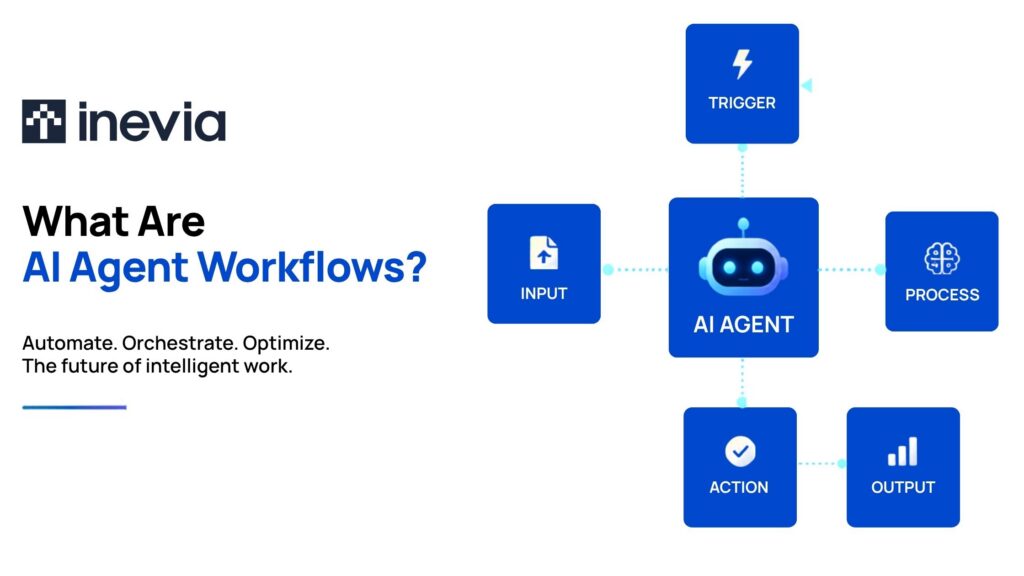
An agent workflow follows six steps:
Detect: An event initiates the workflow, such as an inspection failure, delayed order, incoming supplier message, or machine alert.
Collect: The agent retrieves documents, relevant records, and communications from approved sources.
Interpret: AI models organize the information, establish context, and look for possible causes or actions.
Decide: The agent chooses the next step based on its objective, permissions, and business protocol.
Act or escalate: It completes an authorized action or asks for human approval.
Record and evaluate: The workflow logs its sources and recommendations, along with actions and outcomes.
This operating cycle makes an agent workflow different from a chatbot. A chatbot generally waits for a question. An agent can monitor events and proceed across connected systems.
What are the components of an AI agent workflow?
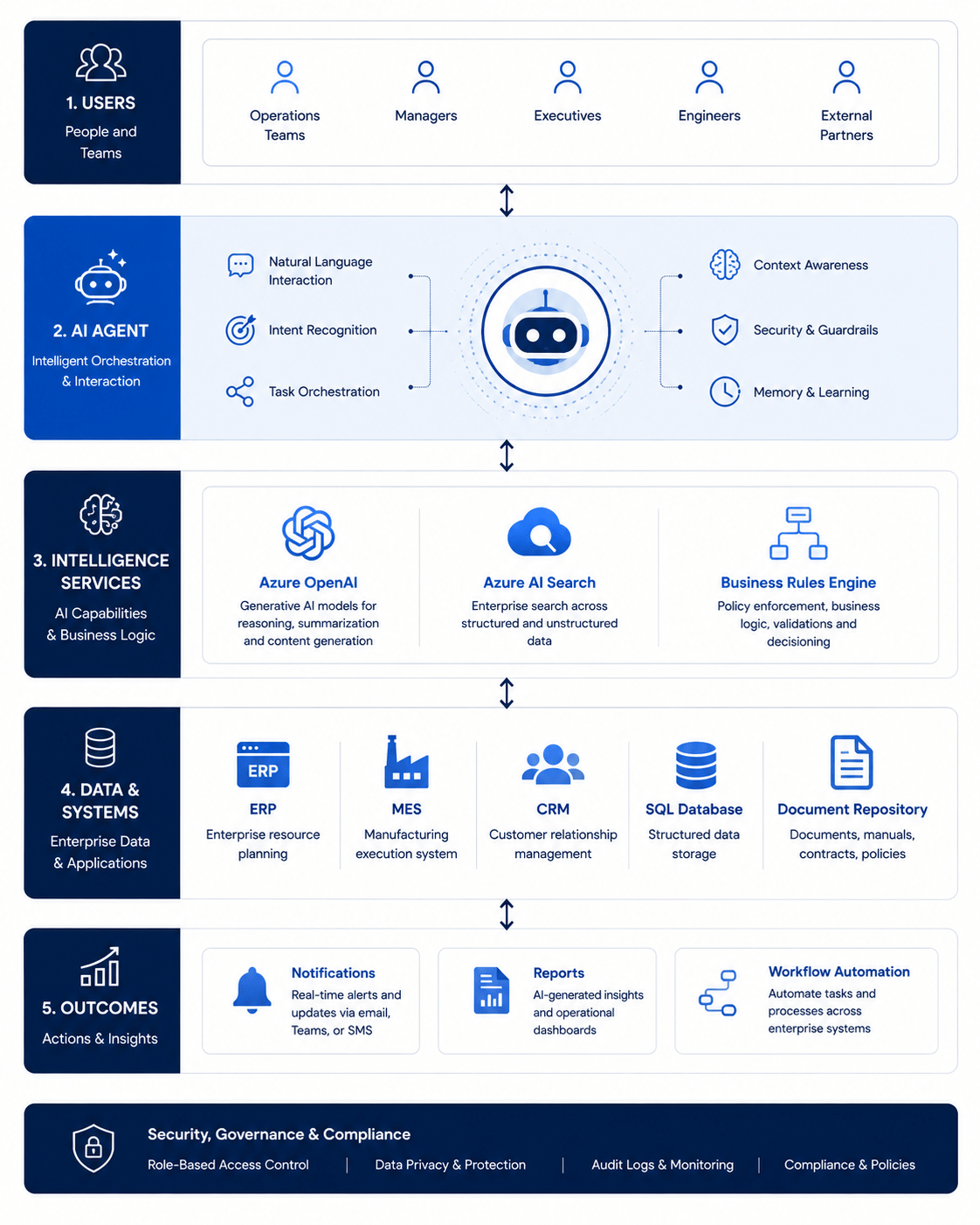
An AI agent workflow depends on some components that are connected with each other.
Goals, triggers and business rules
A specific objective has to be given to an agent. “Improve operational efficiency” is too vague and broad. Here is a better objective that is measurable: “Identify overdue work orders and route all issues to the responsible team”.
Enterprise data
The workflow may require work orders, and inspection results. It may need inventory records and operating procedures, along with maintenance history and supplier communications. The data should be relevant to the decision and reliable too.
AI reasoning
The reasoning layer interprets information. It then recommends an action. It should also notify uncertainty rather than presenting all conclusions as facts.
Tools and system integrations
Agents can carry out useful work when ERP, CRM, and MES are connected to QMS, document repositories, and communication platforms.
Guardrails and human approvals
It is the business that determines what the agent can read, build, recommend, or update. High impact decisions should stay with authorized employees.
For the shop floor, it is better to start with advisory agents within workflows managed by humans, especially where decisions impact safety, quality or live production.
Monitoring
Logs and performance measures reveal what the agent did, why it acted a certain way, and whether its suggestion was accepted.
What are the benefits of AI agent workflows?
An AI agent workflow can save time for employees. It reduces the time spent locating information, requesting updates, and transferring data between systems.
An AI agent workflow can also help with:
- Faster response to any operational issue
- Reducing manual handoffs and missed follow-ups
- Consistent classification as well as routing
- Improved use of existing operational data
- Clearer records of each decision and approval
- More time for teams to focus on exceptions and improving work
These benefits are particularly useful for small and medium-sized companies that have lean operations and IT teams. However, the value mainly depends on improving real processes. If you deploy agents without clear workflows, you simply add another tool to manage.
Until recently, custom development and data science knowledge was needed to create this type of workflow. Orchestration frameworks and reasoning-capable models have made it easy to access agent workflows. It’s a big relief for operations teams working with standard business systems.
How manufacturers use AI agent workflows
For a manufacturer, AI agent workflows have many use cases:
Production and work-order coordination
An agent can monitor the status of work orders. It can identify missing information, and highlight any order which is at risk. It can compare schedules, available materials, and current progress before it suggests an action to the production manager.
Quality and compliance
Agents can easily classify inspection findings. They can assemble supporting records. They can route non-conformances through the appropriate review process. They are also good at retrieving the applicable specification or revision in work instruction.
However, qualified personnel should continue managing deviation approval, product disposition, and changes to quality requirements.
Maintenance work and troubleshooting efforts
A maintenance agent can manage equipment alerts and manuals, while combining maintenance history and technician notes. It can suggest diagnostic steps, make note of relevant spare parts, and create a work order.
The focus should stay on better decision support rather than autonomous control of equipment.
Procurement and supplier coordination
An agent can easily identify material shortages that impact scheduled work. It can review open purchase orders while drafting supplier follow-ups. It can summarize all responses and send alerts to the appropriate buyer when further action is needed.
Documentation and operational knowledge
Agents can help teams locate drawings and procedures, assisting them with managing specifications and previous problem reports. They can also create first drafts of controlled reports with the help of information from approved sources.
Data cleanup and system onboarding
An agent can identify any duplicate records, missing fields, and inconsistent descriptions before information is imported into the CRM, ERP, or MES in use. Proposed corrections and mappings can be reviewed and approved by humans.
Shift summaries and reporting
An agent can compile quality incidents along with downtime into a shift report. This report is structured, containing details of completed work and unresolved actions. The supervisor can accordingly review the report and approve it before sharing with others.
This is often a relevant first use case because it eliminates repetitive work without giving the agent any authority over a high-risk decision.
What are the challenges of using AI agents?
The most common obstacle? Unreliable data. The quality of any agent’s decision can be influenced by inconsistent naming, disconnected records, and outdated documents.
Other challenges with AI agents include:
- Integrating with legacy applications in use
- Controlling access to any sensitive information
- Preventing inaccurate outputs or unsupported outputs
- Defining accountability for actions of agents
- Building employee trust and ensuring adoption
- Maintaining governance with the expansion of workflows
Agents should ideally get access only for their assigned process. Important outputs should involve source information and should be routed for approval in the case of low confidence or significant consequences.
How to implement an AI agent workflow
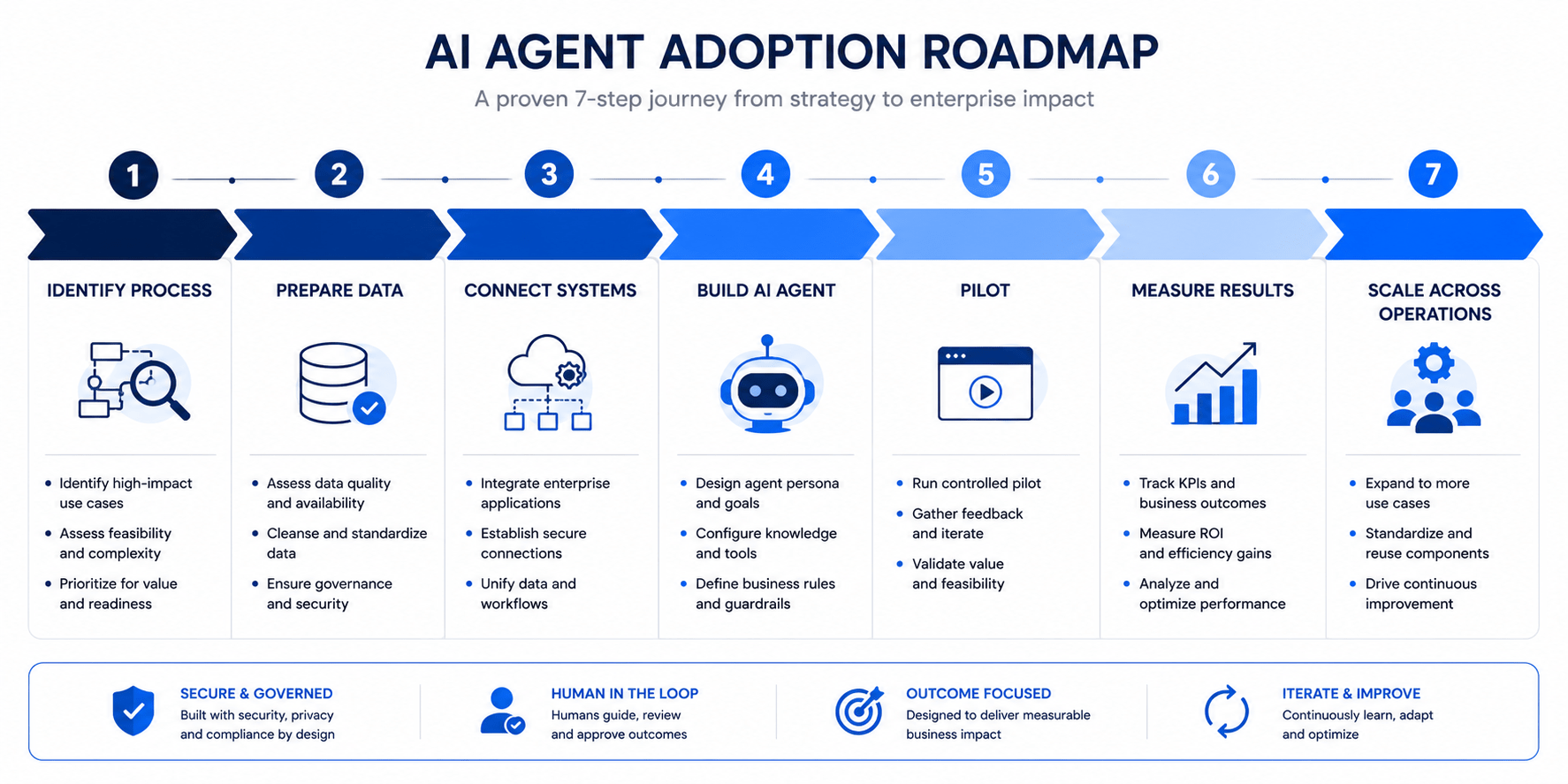
You can start with a high-frequency process that has measurable effort, visible delays, and manageable risk as well.
Then, map the current workflow. Include your emails, systems, spreadsheets, approvals, and decisions. Establish a baseline with the help of manual touchpoints, cycle time, errors, and exception volumes.
Define what the agent can access and what actions it can carry out. Pilot the workflow with a limited process or team. Compare its recommendations with decisions made by employees. Then, investigate disagreements that you observe.
You should expand only after the workflow shows reliable results.
How to measure AI agent workflow performance
Some useful measures are given below:
- Workflow completion time
- Count of manual actions and follow-ups
- Eror and rework rate
- Proportion of recommendations approved
- Employee adoption
- Time saved on repetitive tasks
- Cost of each workflow completed
- Impact on quality, delivery performance, or response time
Activity metrics need not equal business outcomes. It is the underlying process that should show improvement.
How Inevia helps build AI agent workflows
At Inevia, agent workflows are used for improving your operations.
With Inevia’s services, you can:
- Identify suitable use cases
- Prepare operational data
- Integrate CRM with MES platforms
- Define points of human approval
- Build workflows revolving around existing business processes
While these principles apply to any operation, the practical challenge is how you translate them into functional workflows within your systems. This is where Inevia’s approach is unique.
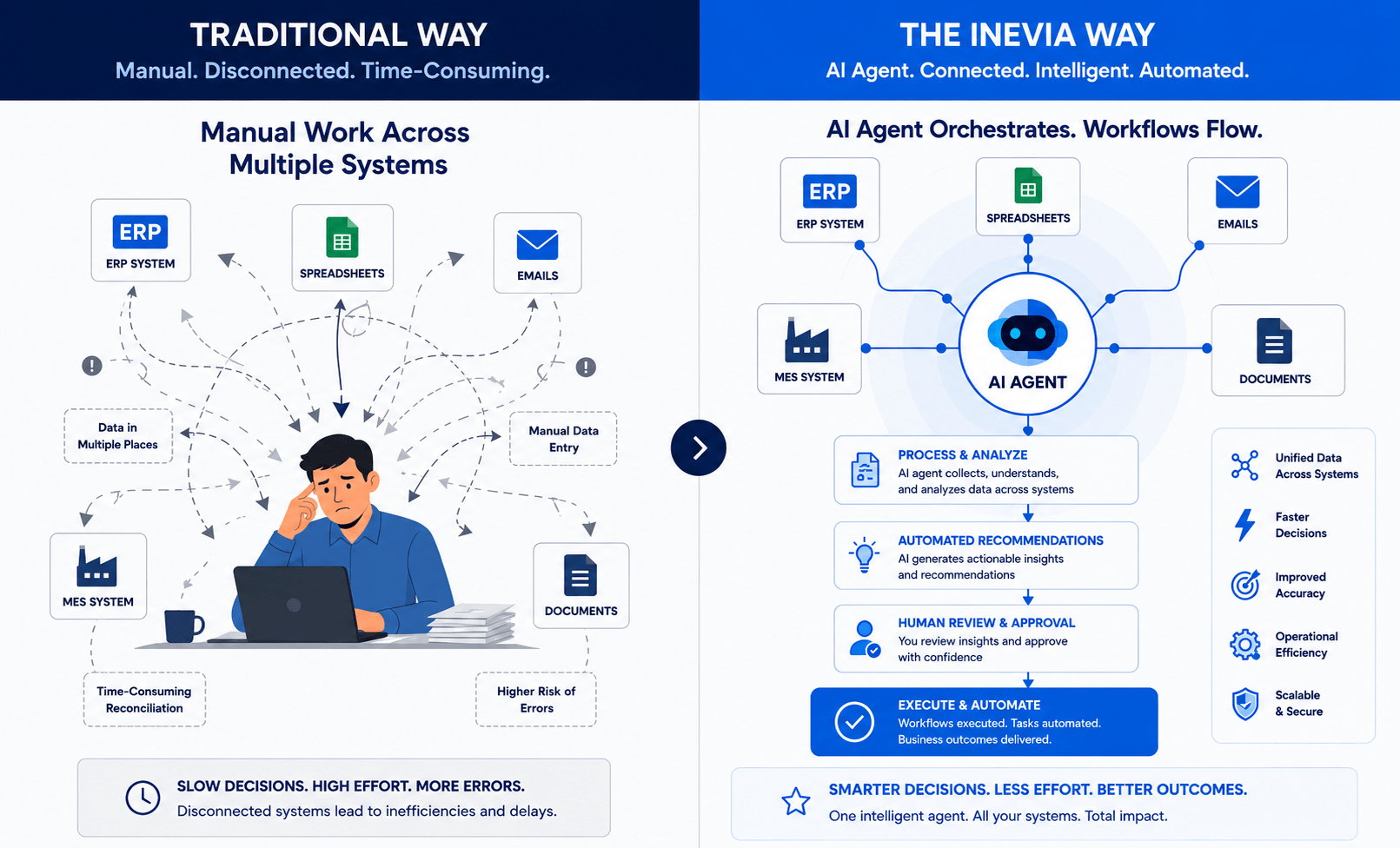
For control over production, agent workflows can also be connected with Inevia’s Traveler MES for using work order, quality, scheduling, and documentation information.
This way, operations teams and manufacturers can start with one practical workflow. This workflow can set the stage for wider AI adoption.
Common questions on AI agent workflows
Is my data ready for an AI agent workflow? How can I confirm?
AI agents need trusted business data to make decisions and complete tasks. Check if your data is consistent, complete, and easy to access. Standardized supplier names, status codes, and part numbers indicate consistent data. Inevia’s free operations review can assess your organization’s AI readiness and identify areas of improvement.
What happens when agents make mistakes?
Guardrails and approvals can avoid mistakes. In a well built workflow, the agent recommends without unilaterally acting on high stakes decisions. Logs show what information was used by the agent along with the reasoning behind its recommendation. When mistakes happen, they become learning opportunities to revise business rules or improve quality of data.
Can an agent workflow disrupt my existing systems?
Agent workflows function alongside existing systems. They read data and trigger actions with the help of APIs or controlled automation. You don’t have to replace your MES or CRM used by teams. Most pilots start with read-only access. Decisions are escalated to humans, managing operational risk.
Do I need data scientists to create these workflows?
This is not necessary. With modern orchestration platforms and low-code platforms, the technical barriers have reduced significantly. The real expertise needed is understanding your process. Check where the delays happen, what data is required, and who makes the important decisions. Inevia uses agent workflows as operational improvement initiatives.
What is the ROI timeline for AI agent workflows?
The ROI depends on the process. However, many focused pilots can show measurable results in a few weeks. For example, a workflow that brings down work-order coordination time from 45 minutes to 15 minutes can result in labor savings. The real ROI can compound as you apply the same approach to other processes.
Next steps: Start with one practical workflow
An AI agent workflow is most effective when the operational problem is clearly defined.
Identify where teams repeatedly look for information, search for system records, or chase various follow-ups. Establish the present performance while setting clear boundaries for the agent. Consequential and important decisions remain in your team’s control.
This approach ensures a practical path from AI experimentation to measurable operational value for your business.