Introduction
Scott is a senior production manager. He just started his morning with two issues.
A batch of machined components was surprisingly outside the specified diameter tolerance. This batch is on hold. The quality team needs to document the corrective action and get approval before proceeding with the batch. The same process is followed for any quality issue.
At the same time, a high-priority production order is running behind schedule. Scott can’t understand the reason behind this delay.
AI can help him in both these situations, but in different ways.
In the first situation, the quality issue has a known path, starting with the batch being reviewed, corrective action being taken, and getting final approval. As this is a known process, an AI workflow is suitable.
In the second situation, the delayed production order must be investigated across production, material, equipment, and quality information. Thus, an AI agent would be better.
What’s the difference between an AI agent and an AI workflow? Understanding this difference can help operations managers choose the best approach for their day-to-day responsibilities.
What is an AI agent?
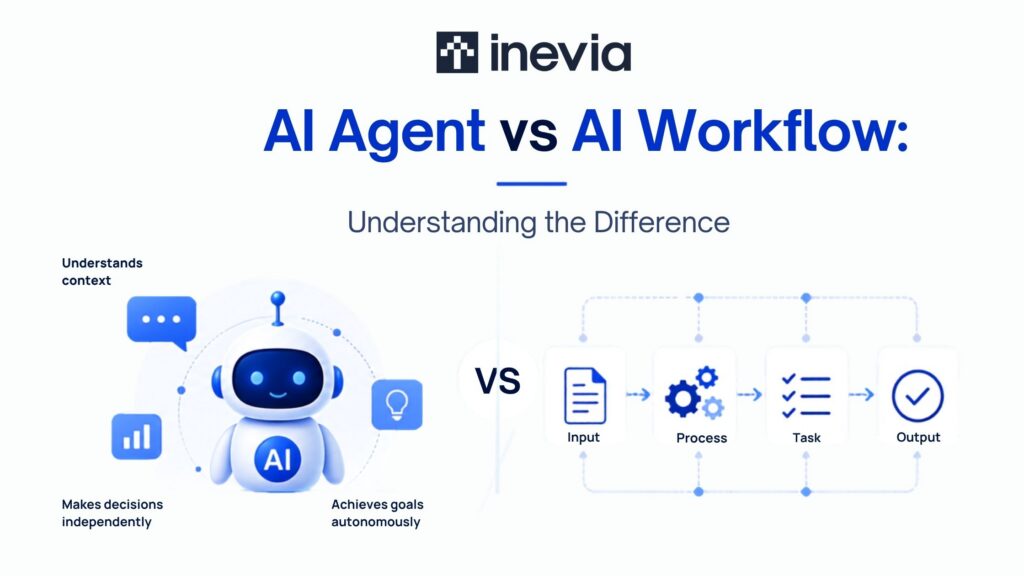
An AI agent can be understood as a system that works toward a defined goal with some amount of independence. It can review the given information and decide what needs attention.
By using available systems or data, it can suggest or take actions permitted by teams.
For example, let’s go back to Scott’s delayed production order. An AI agent could help him check:
- Actual output versus planned output
- Maintenance records
- Machine downtime
- Quality holds
- Material availability
Depending on what it finds, the AI agent could identify the possible causes behind the delay and recommend the next steps to Scott.
This makes agents ideal for scenarios where the investigation can follow a different process each time.
The 2026 State of AI Agents report by Databricks talks about the growing role of agents in business technology. The report states that nearly 80% of databases are built by AI agents.
What is an AI workflow?
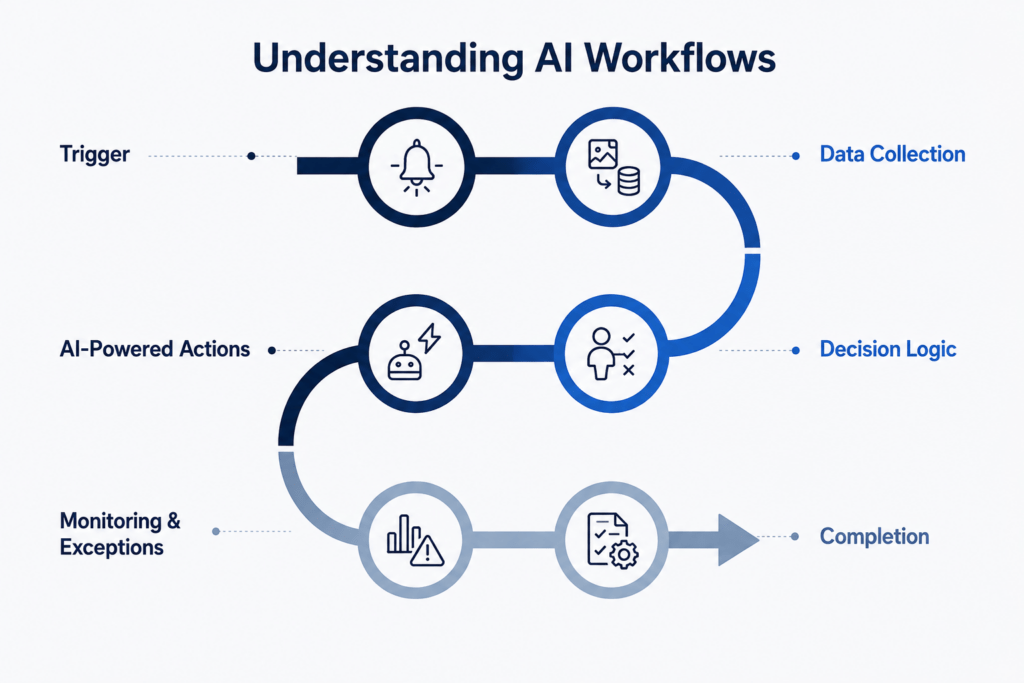
An AI workflow makes use of AI within a process having defined steps.
For example, think of a quality issue reported on the plant floor. Without AI, the day would go something like this:
- The issue is reported
- The reported issue is categorized
- The responsible person is notified
- The corrective action is recorded and documented
- Approval is completed
- The case is closed
Now, imagine this situation with AI.
AI could categorize the operator’s description. It could summarize the issue for the quality manager. It could also make the required documentation. Each step still proceeds through a fixed process.
This same approach can be used in different industries, like healthcare. Incoming patient documents could be checked for missing data, routed to the responsible administrative team, and flagged to the required staff for follow-up.
Hence, AI workflows are useful when process stages and team responsibilities are already established and followed by the organization.
How are AI agents different from AI workflows?
Let’s take the example of a shift handover where a fixed process is generally followed by teams.
Here, the production manager may be required to:
- Calculate production quantities
- Share downtime updates with different teams
- Document quality issues
- Trace outstanding actions
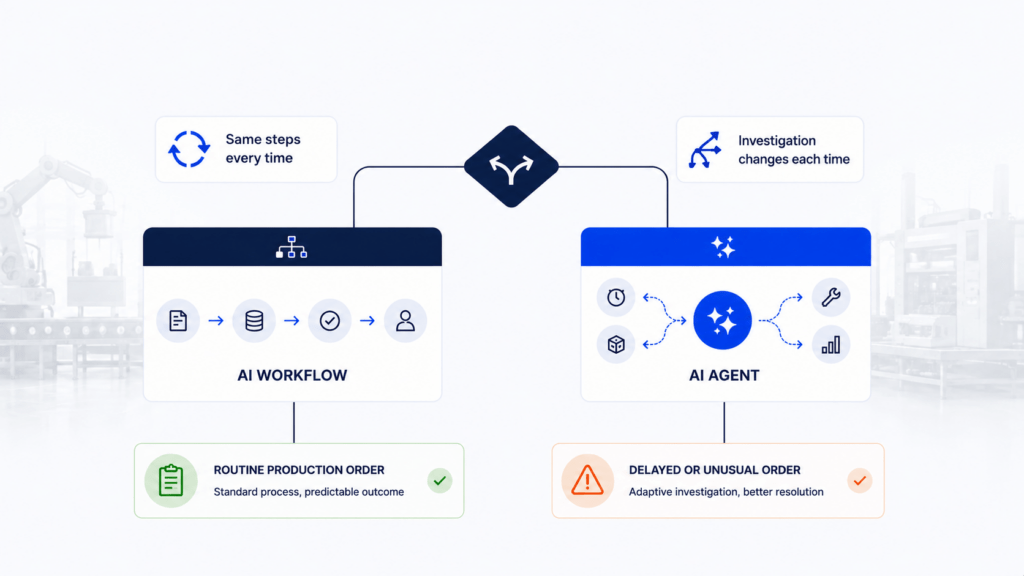
An AI workflow can automate many of these tasks because the process stays consistent most of the times.
What about investigating an unexpected drop in production output? Here, the process is not consistent.
A warehouse supervisor may have to:
- Check cycle times thoroughly
- Track equipment downtime
- Make note of material shortages
- Identify staffing concerns or quality issues
What the supervisor should do next depends on what the investigation reveals to the team.
This brings us to the difference between AI workflows and AI agents:
A workflow can manage processes that have known steps. On the other hand, an agent can handle situations where each step is dependent on what is discovered.
Comparing features of AI agents and AI workflows
| Queries | AI Workflow | AI Agent |
| Are all the steps known previously? | Generally yes | Not always known |
| Does every case follow a similar process or path? | Yes, they are usually known | The path can vary |
| Can investigation be done and different sources be checked? | Yes, within defined steps | As needed by the task concerned |
| Where is human approval needed? | At certain predefined stages | Before recommendations or crucial actions |
| Any manufacturing use case? | Quality approval | Investigating a delayed order |
| Any example for CPQ? | Standard quote approval | Reviewing any non-standard configuration |
When should you make use of AI workflows?
AI workflows can work well when similar activities are done again and again.
Let’s look at some scenarios:
- Manufacturing industry:
With the help of AI workflows, a plant manager can:
- Prepare a shift report
- Route quality issues for the manager’s approval
- Process any maintenance requests
- Update the status of a work order
- Notify purchasing teams when inventory touches a predefined level
These tasks are performed repeatedly. Hence, AI workflows become useful for the plant manager.
- Healthcare administration:
Using AI workflows, a medical super indent can:
- Check incoming patient documentation
- Identify any missing referral data
- Identify missing insurance information
- Route cases to the responsible team
- Send reminders when a certain action is pending
For such tasks, the medical super intendent can make use of AI workflows to ensure better use of time.
- Quote management
A CPQ consultant can use AI workflows for generating quotes for standard equipments. The workflow can help manage:
- Product configuration or costing
- Margin review
- Discount approval
- Creation of final quotation
Such processes have a clear route from start to end. Hence, they can benefit a lot from AI workflows.
When should you consider AI agents?
AI agents are useful when an employee’s decisions are dependent on what’s concluded in investigations.
- For a plant manager:
A plant manager could possibly use an agent to:
- Examine a missed manufacturing target
- Review machine availability
- Investigate the output
- Check material status
- Review quality holds
- Go through maintenance records
AI agents can make these tasks easier for plant managers and take on some of the load.
- For maintenance teams:
AI agents can be handy for maintenance teams to:
- Review equipment history
- Examine recent alarms
- Read technician notes
- Diagnose previous breakdowns
- Monitor any recurring failure
Maintenance teams can benefit a lot by using AI agents for such tasks.
- For healthcare workers:
A healthcare administrator could deply agents to:
- Make note of available resources
- Review appointment delays in departments
- Observe cancellation patterns
- Examine scheduling information
As healthcare is a critical space and each step could prove fatal, AI agents can help manage the tasks.
- For engineering teams:
In the case of engineered to order manufacturing, an agent can:
- Retrieve pricing data
- Review any request for non-standard configurations
- Gather product information that is relevant
- Identify specifications that need review
In all these scenarios, the investigation changes depending on the data that is available.
Can AI agents and AI workflows work together?
Agents and workflows make good partners. Many processes in operations use both approaches.
For example, an MES shows that a production order is running behind schedule.
A workflow can flag the order. It can collect the needed production information.
An AI agent can check the equipment downtime and quality holds. It can examine the material shortages and other possible root causes.
Once each finding is reviewed by the production manager, a workflow can assign actions for follow-up. The workflow can notify the maintenance team or the production department, while keeping track of completion throughout.
Now, let’s see how both approaches could help a CPQ developer.
Standard quotations can proceed through an established workflow. When a customer asks for an unusual product configuration, the agent can acquire the needed data for commercial review before continuing with the quotation process.
Real world use cases seen across different industries
AI Agent use cases
| Vertical | Example |
| Manufacturing | Investigate missed production targets using production, downtime, material, and quality information |
| Maintenance | Review equipment history, alarms, breakdowns, and technician notes to support troubleshooting |
| Quality | Examine recurring defects across machines, shifts, suppliers, products, or batches |
| Healthcare | Investigate recurring appointment delays or administrative bottlenecks |
AI Workflow Use Cases
| Vertical | Example |
| Manufacturing | Prepare shift reports and route quality issues for approval |
| Maintenance | Create and route maintenance requests based on reported equipment issues |
| Healthcare | Check patient documents for missing information and route cases |
| Inventory | Notify purchasing when materials reach predefined levels |
Cost and performance considerations
Since AI workflows conduct a defined set of activities, their costs are usually predictable.
For example, a workflow that prepares a production report after each shift goes through the same process all the time.
Now, an AI agent that is checking a delayed order may have to review the downtime records, production schedule, availability of materials, maintenance history, and also the quality status.
The detailed investigation is needed by the agent before reaching a useful conclusion.
This task may require more AI processing. However, it can also reduce hours spent manually collecting and comparing data.
Governance is also important. According to the Databricks 2026 State of AI Agents report, companies that make use of AI governance move nearly 12x more AI projects into the production stage.
Hence, it is necessary to define approval requirements, decision making responsibilities, access permissions, and approval requirements, with AI becoming more involved in daily operations.
Common mistakes made when choosing between AI agents and AI workflows
- Using an agent for an otherwise straightforward process
A standard approval, notification, or report generally goes through known steps. If you use an agent here, you could unnecessarily introduce complexity in your operations. Better to avoid.
- Having more workflow rules for all exceptions
Your production environment may have a mix of equipment issues, material or quality issues, and some level of scheduling issues. If you try to account for each scenario with additional rules, maintaining workflows becomes tough.
- Giving AI more access than needed
An AI system that is investigating downtime may require information related to production and maintenance. But it may not necessarily need permission to change any production schedule. Access should ideally match the task assigned.
- Making important decisions without employee review
Decisions that impact quality, pricing, production schedules, patient operations, or customer commitments may need final approval from the responsible manager or employee.
How to choose between AI agents and AI workflows
To make the right choice, see how the work in your organization is currently being performed.
If your employees follow almost the same steps for each case, a workflow is generally recommended.
If they spend more time collecting information, comparing probable causes, and deciding what to examine next, an agent can be helpful.
Many operations involve both these patterns.
For example, a plant could be processing thousands of routine production orders while investigating just those orders that are seriously running behind schedule.
A CPQ system could be managing standard configurations automatically while also sending unusual specifications for further review.
AI agents vs AI workflows: Decision matrix
| Operational Step | Ideal Approach |
| Shift reporting | AI workflow |
| Quality or quotation approvals | AI workflow |
| Patient document processing | AI workflow |
| Investigating production delays | AI agent |
| Troubleshooting recurring equipment failures | AI agent |
| Reviewing non-standard product configurations | AI agent |
| Routine process having complex exceptions | AI workflow and AI agent |
How can Inevia help you implement AI?
Inevia helps organizations assess how work moves through their regular operations. Developers at Inevia closely examine:
- Why are approvals slowing down?
- From where do your employees repeatedly get data?
- Which systems are disconnected?
- Where do exceptions need time-consuming investigation?
For manufacturers, AI workflows and agents can help with maintenance coordination, reporting, and production visibility. Agents and workflows can also help with quality management, investigating production issues, and work-order tracking.
For sales and engineering teams, AI can help with approval processes and technical reviews, along with product configurations and making quotations.
Healthcare organizations can use similar features to document any intensive procedures and administrative processes.
Inevia has proven expertise across MES support, CPQ abilities, AI consulting, and custom software solutions.
With these capabilities, Inevia can help your business determine where AI workflows, AI agents, or a mix of both approaches can improve existing processes, delivering measurable operational value for your organization.
Conclusion
Across any organization, some processes follow the same steps every single day. Other processes need an experienced employee to collect data, investigate what exactly went wrong, and determine what should be done next as a corrective measure.
While some processes need AI workflows, other processes work better with AI agents.
Check processes that consume your department’s time today.
Any repetitive steps? Consider using workflows.
Any recurring investigations? Consider deploying agents.
And if you see a mix of both in your organizational processes, use both AI agents as well as AI workflows.
FAQs
Can AI agents completely replace AI workflows?
No. Workflows remain useful for consistent processes. Examples include approvals, reports, and routine processing. On the other hand, agents can support situations where the investigation or required action differs from case to case.
Are AI agents always more expensive to run than workflows?
The costs depend on the task. Agents may process more information during complex investigations. Workflows generally perform a known sequence of activities. The operational time saved should also be looked at when evaluating cost.
Can a small or medium-sized company use AI agents?
Yes. A manufacturer could begin with a focused application, like investigating delayed work orders. A sales team could use an agent to support any non-standard quotation requests. With a clearly defined use case, it is easier to measure results before deciding to expand further.
How to quickly get started with AI workflows?
Choose a repetitive process, like quotation approvals, processing patient documents, shift reporting, or maintenance requests. Document the current steps being followed. Identify where your employees spend maximum time on manual work. And then, choose a process where turnaroud improvements, time improvements, or accuracy improvements can be measured.