Did you know that 73% of companies run multi-agent systems? That’s according to recent research by HFS Research and Cognizant.
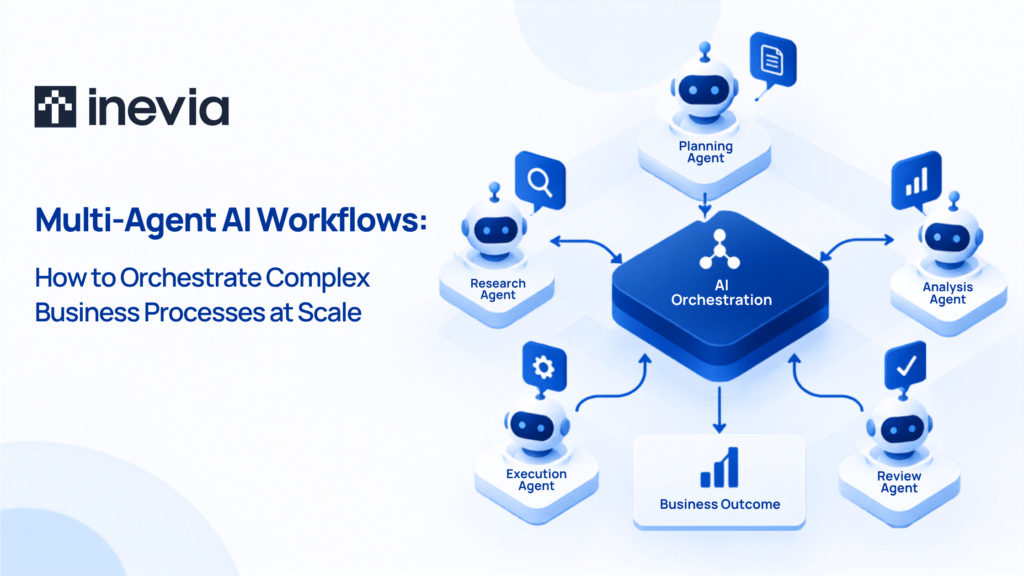
Multi-agent AI brings specialized AI agents together. These agents handle different parts of the business process. They can share information, perform tasks, and involve employees when a certain decision needs human judgement.
For businesses dealing with work that moves across teams, systems and approval levels, multi-agent workflows make it possible AI beyond individual tasks.
In this blog, we explain how multi-agent AI works, where it fits, and considerations before using it in your business.
What Are Multi-Agent AI Workflows?
A multi-agent AI workflow is a business process carried out by two or more AI agents that coordinate their work to complete a shared task or achieve a defined outcome.
Each agent has its own role, instructions, and access to the tools or information needed for that role.
- Supplier onboarding, for example, could involve a document agent that organizes the files submitted by a supplier.
- A verification agent checks whether the required information is complete.
- Contract terms can then go through a policy check, followed by the necessary approvals.
- Once approved, the supplier details can be prepared for onboarding.
All of these agents are contributing to the same piece of work.
Multi-agent orchestration keeps these activities connected. It manages:
- Which agent gets a task
- What information moves between agents
- The order in which activities happen
- Where an employee joins the process.
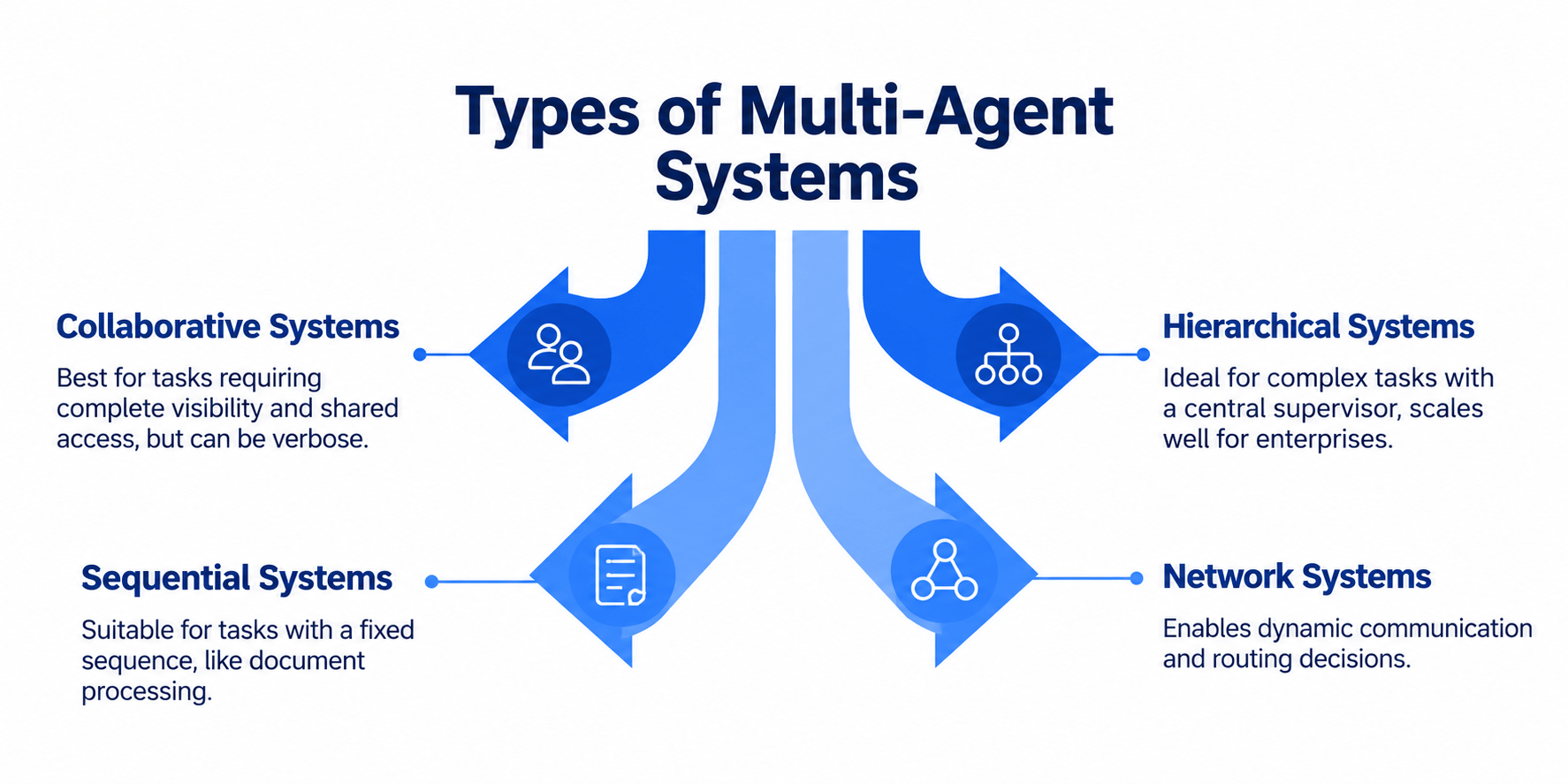
Agents don’t always have to follow a fixed path. One may pass a task to another based on what it finds. Two agents may work at the same time. An agent may also stop and ask for human approval before the work continues.
While an AI agent handles a defined responsibility, a multi-agent system brings such agents together. Orchestration manages how agentsthey work with one another.
How Do Multi-Agent Workflows Work?
Let’s take customer quotations for example.
A customer sends product requirements. Engineering needs to confirm what can be built. Component costs affect the price, commercial rules have to be applied, and larger discounts may need approval.
In a multi-agent system, a requirements agent could organize the customer’s specifications and send them to a product agent.
Once suitable configurations have been identified, a pricing agent works out the quotation using current costs and pricing rules.
If the proposed discount crosses an authorized limit, the quotation goes for approval. The responsible employee can then review the completed information before anything reaches the customer.
The work doesn’t necessarily move in a straight line.
- If the requested configuration is unavailable, the product agent might identify alternatives and send them back for comparison.
- Checks that don’t depend on each other can happen at the same time, shortening the wait between stages.
- Your team stays involved where experience, judgement, or authority matters.
Agents handle more of the searching, checking, organizing and handoffs around those decisions.
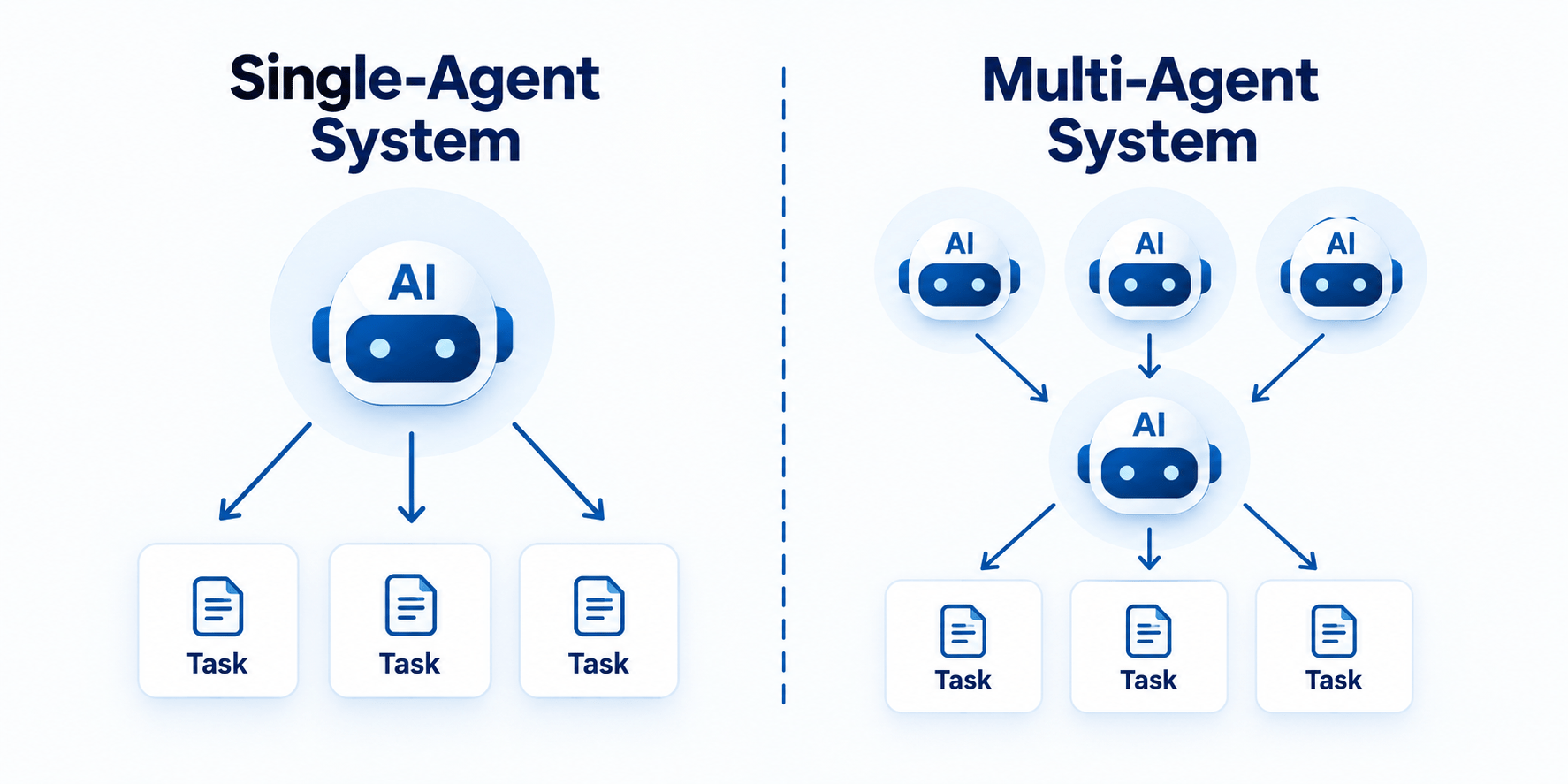
Multi-Agent vs. Single-Agent Systems
One agent may be enough if you want AI to search for company knowledge, categorize incoming enquiries, or summarize reports.
However, when your work involves different responsibilities and levels of authority, you need a multi-agent system.
For example, a quotation might involve sales, engineering, and finance. Supplier approval could require procurement, quality, and legal input.
| Single AI agent | Multi-agent system |
| Handles a focused task | Handles different parts of a larger business process |
| Has one defined role | Agents have specialized roles |
| Works with a limited set of tools and information | Each agent can have access based on its role |
| Easier to build and monitor | Requires orchestration and closer monitoring |
| Suits contained activities | Suits work with multiple decisions and handoffs |
More agents also mean more interactions to manage and potentially higher running costs.
A fixed, rule-based task may work well with traditional automation. One focused AI task may need only one agent.
On the other hand, multi-agent AI makes sense when the work benefits from distinct roles that need to share information and act on each other’s results.
Benefits of Multi-Agent Workflows
Using multi-agent AI has tremendous business value. Some benefits are given below:
- Less manual coordination: With multi-agent workflows, employees spend less time checking status, looking for information, and passing updates between departments.
- Faster progress across tasks: Activities that don’t depend on each other can run at the same time. Your team doesn’t always have to wait for one checklist to finish before another begins.
- Clearer division of responsibilities: Each agent can have a defined job, access level and set of rules. That makes it easier to control what an agent can see and do.
- Better support for changing situations: A process can follow different routes depending on the information your agents find. A stock shortage, failed quality check or missing document can change what happens next.
- More room for human judgement: Employees can remain responsible for high-impact decisions while agents handle the work leading up to them.
The value of multi-agent workflows depends on the process you intend to improve.
Multi-Agent Orchestration Architectures
Multi-agent systems can be organized in different ways. The structure affects how agents communicate, how decisions move through the system, and which processes stay in your control.
Centralized Orchestration
In a centralized setup, one orchestrator manages the overall flow of work.
Employee onboarding could use this model.
- The orchestrator sends documentation checks to one agent, account setup to another agent, and training activities to a third agent.
- It also keeps track of what has been completed and what still needs attention.
Having one central coordinator can make processes with clear rules and approval points easier to follow.
Decentralized Orchestration
A decentralized setup allows agents to communicate directly.
- When stock falls below an agreed level, an inventory agent might send the requirement to a purchasing agent.
- Purchasing checks the buying rules and passes the request to a supplier agent to confirm availability and lead times.
- Agents have more freedom to respond as conditions change.
- Businesses also need good visibility because work can move through different routes instead of returning to one central coordinator each time.
Hierarchical Orchestration
Some business processes are easier to manage in layers.
- During a product launch, a commercial supervisor agent could oversee pricing and sales-readiness activities, while an operations supervisor manages sourcing, production and fulfilment.
- Specialist agents underneath them take care of individual tasks.
The structure resembles teams working under different managers while contributing to the same project.
When Should You Use a Multi-Agent Workflow?
Multi-agent workflows can help you when:
- You’re waiting for someone to send you information.
- You need to check different sources before you answer customer queries.
- Someone has to follow up to ensure your task is completed.
Employees might waste a lot of time finding information, checking status, and coordinating between departments.
Multi-agent AI can help when work crosses teams, draws on information from different places, contains multiple decisions, or changes direction based on what happens along the way.
Supplier onboarding, contract reviews, employee onboarding, audit preparation, product launches, quality investigations and approval-heavy work can benefit from multi-agent workflows.
Straightforward work may need a simpler solution. The strongest case for multi-agent AI is usually a process where coordination itself has become part of the problem.
Multi-Agent Orchestration Use Cases
Supply Chain and Logistics
Bringing a supplier on board can involve qualification checks, documents, contracts, approvals, and setup.
While a qualification agent checks whether the supplier meets your requirements, a document agent can verify the submitted records. Contract terms move through the required review, followed by approval and onboarding.
Multi-agent AI can also support quality investigations.
Inspection records, previous supplier issues and information from the affected production job can be gathered by agents with different roles.
The quality manager receives a more complete picture without spending as much time searching across sources.
Retail and E-commerce
A product starts selling faster than expected. Stock is falling, replenishment needs to change, and open customer orders still have to be fulfilled.
The inventory agent checks stock across locations, while the replenishment agent works out what needs to be reordered. At the same time, a fulfilment agent looks at open orders and expected delivery dates.
If supply cannot cover demand, the manager can see the shortage, affected orders, and available replenishment options together.
Instead of waiting for updates from different teams, the business can respond with a clearer view of what is happening.
Healthcare Services
Patient administration involves connected activities such as appointment scheduling, insurance verification, records, and communication between teams.
A scheduling agent can identify suitable appointment slots, while an insurance agent checks coverage information.
Patient records can be prepared for the appropriate team as the appointment moves forward.
Agents take care of administrative work around the patient journey, while clinical decisions remain with qualified healthcare professionals.
Financial Services
A business loan application may go through document checks, financial analysis, risk assessment, compliance review and approval.
One agent can check whether the application is complete before financial information moves to analysis.
Risk and compliance checks can happen through agents with the appropriate instructions and access.
Once the required reviews are finished, the employee responsible for the lending decision receives the application with the supporting findings.
Customer Service
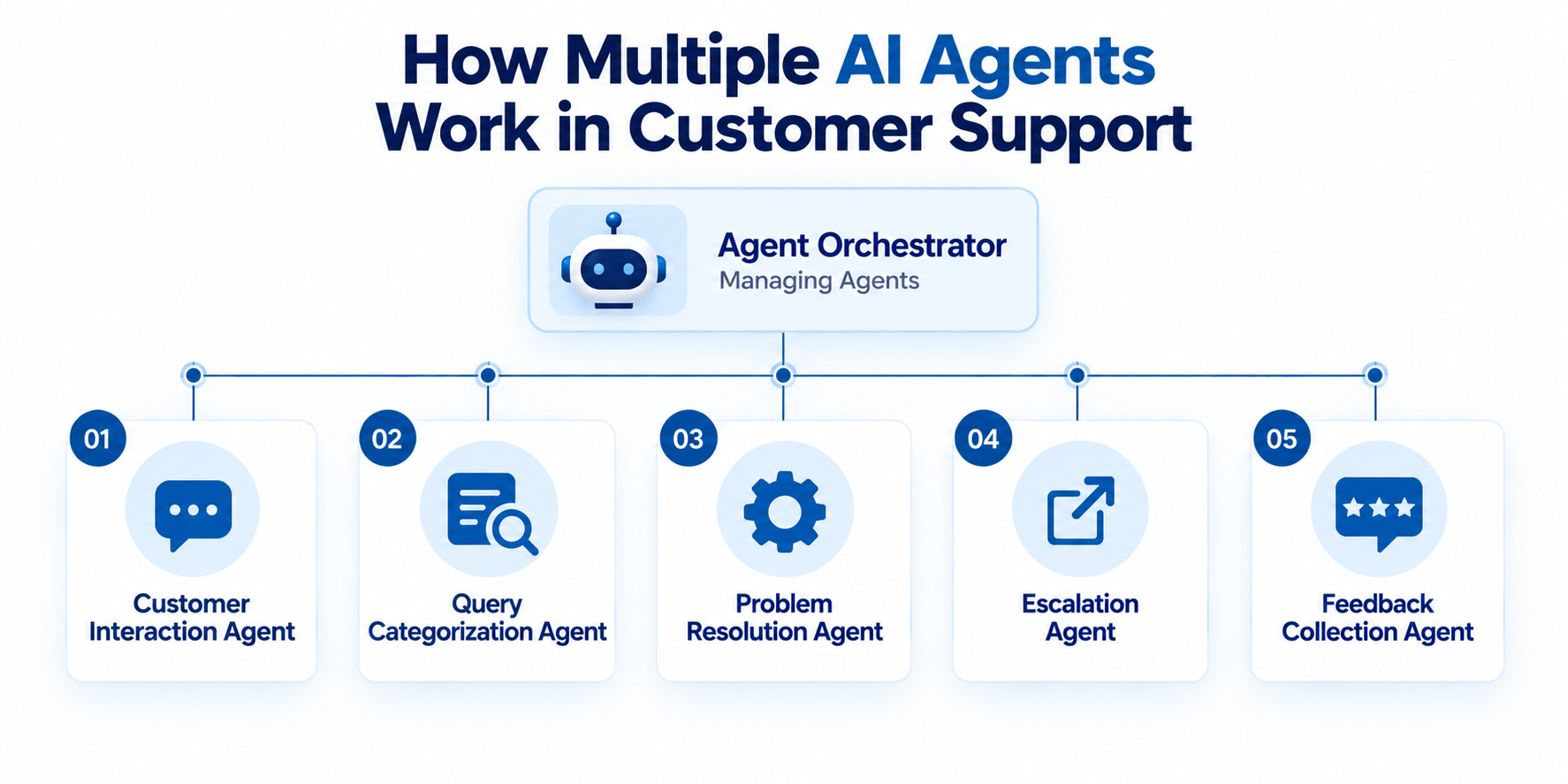
A customer asks whether a product is covered under warranty.
Before answering, the service representative may need the customer’s details, original purchase record, product information, and the warranty terms that apply.
An account agent can confirm the customer information, an order agent can find the purchase record, and a policy agent can check the warranty conditions.
The representative receives the information needed to resolve the enquiry without having to search through each source manually.
(Diagram reference: Multi-agent workflow in customer support)
Managing Multi-Agent Workflows at Scale
As agents begin relying on one another’s work, an incorrect output at one stage can affect later actions.
A recent Cognizant report found that 21% of surveyed enterprises experienced cascading failures when one agent malfunctioned, while 22% encountered unexpected agent behavior.
Suppose an agent picks up an outdated component price. That figure goes into the quotation calculation. The approval agent then checks a discount that appears to fall within its authorized limit, even though the original price was wrong.
Your team needs to know which information was used, what each agent did, and where the issue entered the process.
Permissions can limit what agents are allowed to access or change. Approval points keep employees involved in higher-risk actions. Audit records make agent activity traceable, while fallback rules determine what should happen when an agent fails or produces an uncertain result.
Running costs are also important. Agent interactions use AI models, computing resources, and connected applications.
Tracking usage alongside business results helps you understand whether the system continues to make financial sense as it grows.
Build Multi-Agent Workflows with Inevia
At Inevia, we begin with how the work happens in your business.
Where does information come from? Who makes each decision? Which steps keep employees waiting? Where do people spend time checking, following up or moving information manually?
The answers to these questions help us determine whether traditional automation, one AI agent or a multi-agent system is best for your.
We also look at the information agents will rely on, the systems they need to work with, access permissions and the points where your employees should remain involved.
Inevia can support the design, development, integration, and orchestration of the agents around your business process.

Inevia’s no cost Proof of Concept gives you a way to test an approach, measure the results, and decide whether a wider implementation makes sense for your business.
Have a business process that takes too much coordination? Talk to Inevia about your AI use case.
Conclusion
Moving forward, companies will see AI agents taking on more specialized roles and working together across business processes.
For small and medium enterprises, the opportunities lie in familiar problems, like an approval everyone keeps chasing, a customer question that requires information from different sources, or a supplier review that keeps moving between teams.
Multi-agent AI gives you a way to rethink how work is done across your business, while keeping people involved in the decisions that need human judgement.
FAQs
1. Is multi-agent AI suitable for small and medium businesses?
Yes, if the business has a process where the added coordination is justified. Company size matters less than the nature of the work. An SME with time-consuming quotations, supplier approvals or customer requests may have a stronger case than a larger company trying to automate a simple task.
2. Do all AI agents in a multi-agent system use the same AI model?
No. Different agents can use different AI models depending on what they need to do. A business may choose models based on factors such as accuracy, speed, cost, and the type of information being handled.
3. Can multi-agent AI work with older business software?
It can, depending on how the software allows information to be accessed or actions to be performed. APIs and other integrations can connect agents with many existing applications. Older systems with limited integration options may require additional work.
4. How long does it take to build a multi-agent AI system?
The timeline depends on the business process, number of agents, quality of the underlying information, integrations, and security requirements. Testing one defined use case through Inevia’s 30 day Proof of Concept can give you a good estimate of timelines for your business.